dbt Snapshots
Things change.
That's good... Until you need to see how things were before. 🤔
In the data world, changes are often tracked by Slowly Changing Dimensions (SCDs).
It's simple: To update a table while preserving history, add two columns to mark the row's effective "begin date" and "end date." That gives a window for when each row is active. "Current" records have a NULL end date or some fake end date like 9999-12-31. When a change occurs, dig through the table to find the previous record; update its "end date" to today. Then insert a new record with a "begin date" that perfectly matches the previous record's "end date." 🥴
Okay, so it's not simple. It's quite difficult to get SCDs right.
Which is why dbt Snapshots are helpful.
Snapshots are dbt's implementation of Slowly Changing Dimension Type 2 tables. Give dbt a few details on what you want to track, and dbt will automagically handle the grunt work for you.
Basics
It goes like this: First, pick a source table to track. Then when you run dbt snapshot, dbt generates a 2nd table (a "snapshot" table) with SCD Type 2 columns. Each time you run the snapshot command, dbt compares the source and snapshot tables. If needed, dbt updates the snapshot to show changes in the source.
New rows in the source are added to the snapshot. Any modified rows are reflected in the snapshot. That's it!
Well, there's a bit more set up you need. 😅
How does dbt know which rows in the snapshot map to a row from the source? That's where the unique_key comes in. The unique_key is some combination of columns in the source table that identifies a single row in the table. Think of unique_key as the primary key of the table. dbt uses the unique_key to play matchmaker: It links rows in the snapshot to rows in the source table.
After rows are matched, how does dbt determine if the source row has changed? YOU get to decide by picking one of two strategies: timestamp or check.
The timestamp strategy is easier. Ideally, the source table has some kind of timestamp column indicating when the row was updated. dbt uses this column to decide if a record in the snapshot is out-of-date with the source table. If the source row's update timestamp is newer than the last time the snapshot ran, dbt updates the stale row in the snapshot and creates a new snapshot row.
The check strategy works well for source tables that don't have a column marking the row's last update. For each row, dbt "checks" a list of columns between the snapshot and the source table. If any of these columns have changed, dbt updates the stale row in the snapshot and creates a new row. But if all columns in the source match the latest version in the snapshot, dbt does nothing. This approach is more fragile, especially when the schema changes. A column in the list-of-columns-to-watch may drop. Or a new column that you want to track may enter the table. Both schema evolutions require an update to the snapshot configuration.
Demo
Enough talk, let's set up a snapshot!
First, here's your source table: students. When a row changes, its value in the last_updated column updates to the current time.
| id | name | house | last_updated |
|---|---|---|---|
| 1 | Harry | Gryffindor | 2026-07-27 |
| 2 | Draco | Slytherin | 2027-07-27 |
We'll play in a Snowflake wonderland, using database demo and schema core for this table.
Nowadays, snapshots are configured in a YAML file like this:
- Pick a name for the snapshot.
- Enter the source table.
- Add the
unique_id. - Determine the strategy (timestamp or check).
- If you picked "timestamp," declare the
updated_atcolumn. - If you picked "check," declare the columns to check in
check_cols.
- If you picked "timestamp," declare the
Here's an example configuration using a timestamp strategy:
# snapshots/students_snapshot.yml
snapshots:
  - name: students_snapshot
    relation: source("core", "students")
    config:
      database: demo
      schema: snapshot
      unique_key: id
      strategy: timestamp
      updated_at: last_updated
Here, the name key stores the snapshot's name (students_snapshot). The relation key points to the students table as the source of the snapshot. The source can be either a dbt source tag or a ref tag.
The config node indicates the database and schema the snapshot should live in. Unsurprisingly the unique_key is id. And since the strategy is "timestamp," the updated_at key is set to last_updated (i.e. the column that represents when each row was last updated).
The YAML file can live in the models folder or the snapshots folder of the dbt project. But I'm a purist. I like to keep my snapshots in snapshots/ while my models live in models/. 😁 Here's where snapshots should go in a standard dbt project structure:
.
├── analyses
├── dbt_project.yml
├── logs
├── macros
├── models
│   └── sources.yml
├── README.md
├── seeds
├── snapshots
│   └── students_snapshot.yml  # <--- put the YAML file in the snapshot folder if you're sane
└── tests
Putting it all together, your source table is demo.core.students, and you'll attempt to make a snapshot at demo.snapshot.students_snapshot.
Time to pull the trigger! Run the dbt snapshot command in the terminal:
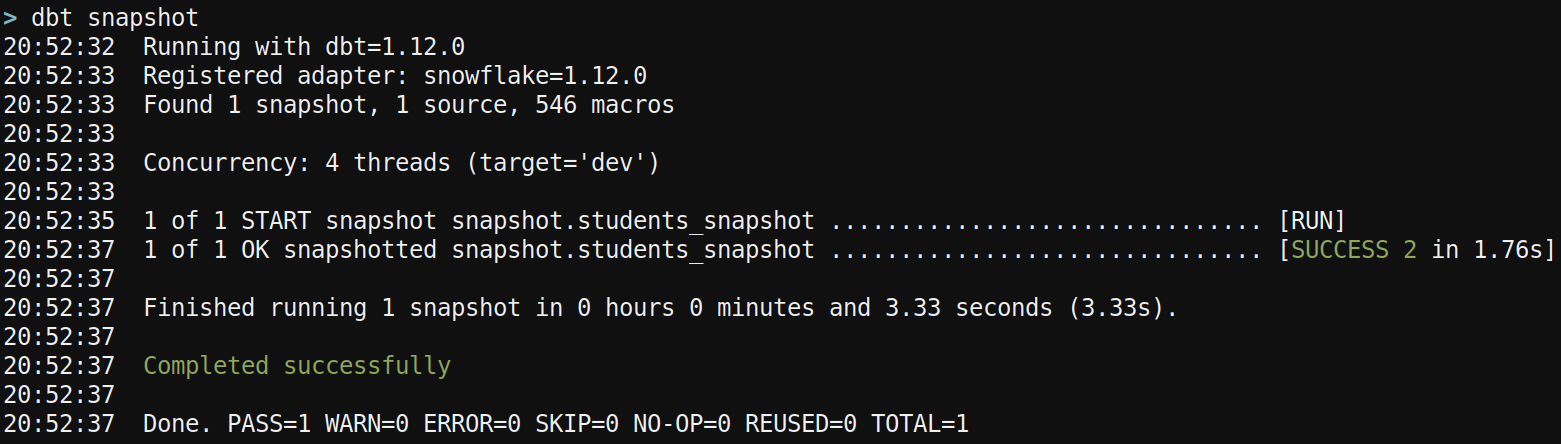
The first snapshot run builds the snapshot table. The [SUCCESS 2 in ...] note indicates that 2 rows were processed in the snapshot. Let's check out the source table and snapshot table:
 > select * from demo.core.students;
+------------------------------------------------------+
| ID | NAME  | HOUSE      | LAST_UPDATED               |
|----+-------+------------+----------------------------|
| 1  | Harry | Gryffindor | 2026-07-27 13:51:49.664000 |
| 2  | Draco | Slytherin  | 2026-07-27 13:51:49.664000 |
+------------------------------------------------------+

 > select * from demo.snapshot.students_snapshot;
+------------------------------------------------------------------------------------------------------------------------------------------------------------------+
| ID | NAME  | HOUSE      | LAST_UPDATED               | DBT_SCD_ID                       | DBT_UPDATED_AT             | DBT_VALID_FROM             | DBT_VALID_TO |
|----+-------+------------+----------------------------+----------------------------------+----------------------------+----------------------------+--------------|
| 1  | Harry | Gryffindor | 2026-07-27 13:51:49.664000 | ad3ce94017f7256b6fbd69df57d8d14d | 2026-07-27 13:51:49.664000 | 2026-07-27 13:51:49.664000 | NULL         |
| 2  | Draco | Slytherin  | 2026-07-27 13:51:49.664000 | d63c4b0fb88358b0cac8de4f0a3edbf2 | 2026-07-27 13:51:49.664000 | 2026-07-27 13:51:49.664000 | NULL         |
+------------------------------------------------------------------------------------------------------------------------------------------------------------------+
Notice how the snapshot has the same columns as the source table. But it also has some extra meta columns. 👀
dbt_valid_from: indicates when the record starts being active.dbt_valid_to: indicates when the record stops being active. Right now, all rows have a NULLdbt_valid_to, meaning all rows are active.dbt_scd_id: used internally by dbt when updating snapshots.dbt_scd_idis a combination of theunique_keyand a timestamp of when the row was updated. Its values look funny because it's a hash of the concatenation. Thedbt_scd_idis used to determine which rows need to be updated when dbt snapshot runs.dbt_updated_at: says when the row was modified or inserted into the source table.
Neat! Now let's change our source table and see how the snapshot reacts. You'll add a row, modify a row, and delete a row.
Add a New Row
Let's add a boss witch to the party:
insert into students values
(3, 'Hermione', 'Gryffindor', current_timestamp());
A new record now appears in the source students table.
Then re-run the snapshot. Remember, dbt will attempt to find any new rows or any modified rows in the source:
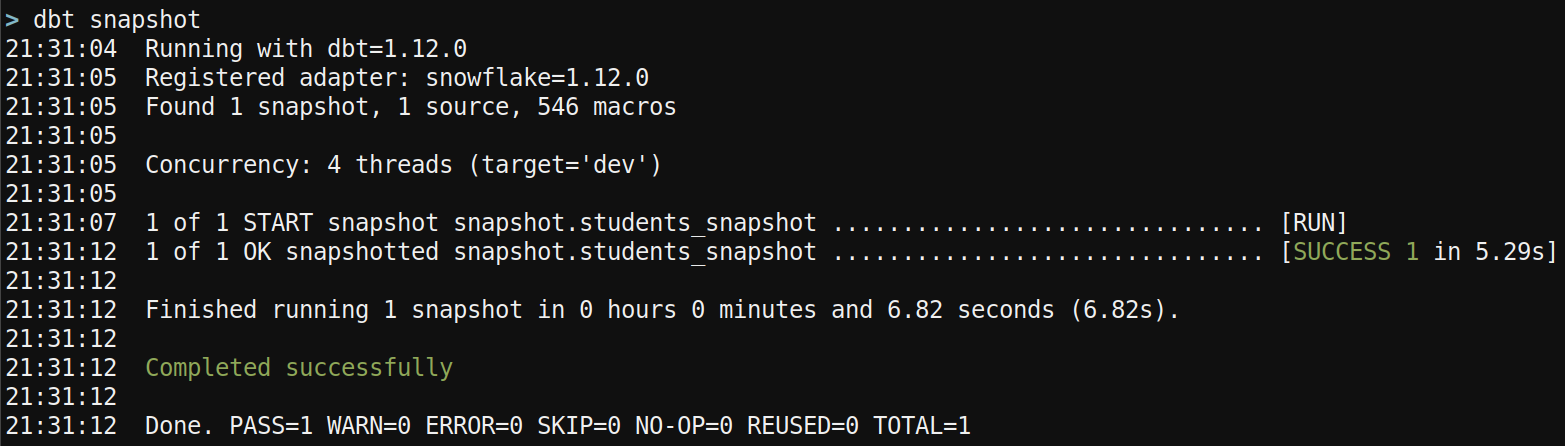
This time you see 1 row is impacted in the snapshot. This makes sense because you added one row and did not modify any existing rows. Check the source and snapshot tables again:
 > select * from demo.core.students;
+---------------------------------------------------------+
| ID | NAME     | HOUSE      | LAST_UPDATED               |
|----+----------+------------+----------------------------|
| 1  | Harry    | Gryffindor | 2026-07-27 13:51:49.664000 |
| 2  | Draco    | Slytherin  | 2026-07-27 13:51:49.664000 |
| 3  | Hermione | Gryffindor | 2026-07-27 14:28:11.968000 |
+---------------------------------------------------------+

 > select * from demo.snapshot.students_snapshot
   order by id, dbt_valid_from;
+---------------------------------------------------------------------------------------------------------------------------------------------------------------------+
| ID | NAME     | HOUSE      | LAST_UPDATED               | DBT_SCD_ID                       | DBT_UPDATED_AT             | DBT_VALID_FROM             | DBT_VALID_TO |
|----+----------+------------+----------------------------+----------------------------------+----------------------------+----------------------------+--------------|
| 1  | Harry    | Gryffindor | 2026-07-27 13:51:49.664000 | ad3ce94017f7256b6fbd69df57d8d14d | 2026-07-27 13:51:49.664000 | 2026-07-27 13:51:49.664000 | NULL         |
| 2  | Draco    | Slytherin  | 2026-07-27 13:51:49.664000 | d63c4b0fb88358b0cac8de4f0a3edbf2 | 2026-07-27 13:51:49.664000 | 2026-07-27 13:51:49.664000 | NULL         |
| 3  | Hermione | Gryffindor | 2026-07-27 14:28:11.968000 | dbbe1163134d722b88104dab95da1689 | 2026-07-27 14:28:11.968000 | 2026-07-27 14:28:11.968000 | NULL         |
+---------------------------------------------------------------------------------------------------------------------------------------------------------------------+
As expected, the new record (Hermione) was added to the snapshot students_snapshot as well! Note the different values for dbt_updated_at and dbt_valid_from.
Modify a Row
Now, let's make things interesting. You'll modify a row in the source and re-snapshot the table.
update students
set name = 'HARRY', last_updated = current_timestamp()
where id = 1;
Here you target Harry's row with id = 1 and update the name to be uppercase. Of course, you update the last_updated column to tell the reader when this row was updated.
Running dbt snapshot again will show that 1 row was updated:
> dbt snapshot
...
21:39:01  1 of 1 START snapshot snapshot.students_snapshot ............................... [RUN]
21:39:06  1 of 1 OK snapshotted snapshot.students_snapshot ............................... [SUCCESS 1 in 4.68s]
21:39:06
21:39:06  Finished running 1 snapshot in 0 hours 0 minutes and 6.28 seconds (6.28s).
21:39:06
21:39:06  Completed successfully
21:39:06
21:39:06  Done. PASS=1 WARN=0 ERROR=0 SKIP=0 NO-OP=0 REUSED=0 TOTAL=1
Drumroll please...
 > select * from demo.core.students;
+---------------------------------------------------------+
| ID | NAME     | HOUSE      | LAST_UPDATED               |
|----+----------+------------+----------------------------|
| 1  | HARRY    | Gryffindor | 2026-07-27 14:37:14.920000 |
| 2  | Draco    | Slytherin  | 2026-07-27 13:51:49.664000 |
| 3  | Hermione | Gryffindor | 2026-07-27 14:28:11.968000 |
+---------------------------------------------------------+

 > select * from demo.snapshot.students_snapshot
   order by id, dbt_valid_from;
+-----------------------------------------------------------------------------------------------------------------------------------------------------------------------------------+
| ID | NAME     | HOUSE      | LAST_UPDATED               | DBT_SCD_ID                       | DBT_UPDATED_AT             | DBT_VALID_FROM             | DBT_VALID_TO               |
|----+----------+------------+----------------------------+----------------------------------+----------------------------+----------------------------+----------------------------|
| 1  | Harry    | Gryffindor | 2026-07-27 13:51:49.664000 | ad3ce94017f7256b6fbd69df57d8d14d | 2026-07-27 13:51:49.664000 | 2026-07-27 13:51:49.664000 | 2026-07-27 14:37:14.920000 |
| 1  | HARRY    | Gryffindor | 2026-07-27 14:37:14.920000 | 58150a63e572754a63c204d2f1d020d4 | 2026-07-27 14:37:14.920000 | 2026-07-27 14:37:14.920000 | NULL                       |
| 2  | Draco    | Slytherin  | 2026-07-27 13:51:49.664000 | d63c4b0fb88358b0cac8de4f0a3edbf2 | 2026-07-27 13:51:49.664000 | 2026-07-27 13:51:49.664000 | NULL                       |
| 3  | Hermione | Gryffindor | 2026-07-27 14:28:11.968000 | dbbe1163134d722b88104dab95da1689 | 2026-07-27 14:28:11.968000 | 2026-07-27 14:28:11.968000 | NULL                       |
+-----------------------------------------------------------------------------------------------------------------------------------------------------------------------------------+
WHOA! Now the snapshot has two versions of Harry's row. Check out how the dbt_valid_from and dbt_valid_to values dance together for the first two rows. The first record is active from 13:51 to 14:37. The 2nd row becomes active exactly when the 1st row becomes invalid. This is a functioning SCD Type 2 table!
Delete a Row
Let's remove Draco from the source (id = 2).
delete from students
where id = 2;
Surprisingly, another dbt snapshot call shows 0 rows were updated.
> dbt snapshot
...
21:43:57  1 of 1 START snapshot snapshot.students_snapshot ............................... [RUN]
21:44:00  1 of 1 OK snapshotted snapshot.students_snapshot ............................... [SUCCESS 0 in 3.61s]
21:44:01
21:44:01  Finished running 1 snapshot in 0 hours 0 minutes and 5.12 seconds (5.12s).
21:44:01
21:44:01  Completed successfully
21:44:01
21:44:01  Done. PASS=1 WARN=0 ERROR=0 SKIP=0 NO-OP=0 REUSED=0 TOTAL=1
And if you check the source and snapshot again, you see the record WAS removed from the source, but the snapshot doesn't reflect that. Draco's row still has a NULL dbt_valid_to. 🫢
 > select * from demo.core.students;
+---------------------------------------------------------+
| ID | NAME     | HOUSE      | LAST_UPDATED               |
|----+----------+------------+----------------------------|
| 1  | HARRY    | Gryffindor | 2026-07-27 14:37:14.920000 |
| 3  | Hermione | Gryffindor | 2026-07-27 14:28:11.968000 |
+---------------------------------------------------------+

 > select * from demo.snapshot.students_snapshot
   order by id, dbt_valid_from;
+-----------------------------------------------------------------------------------------------------------------------------------------------------------------------------------+
| ID | NAME     | HOUSE      | LAST_UPDATED               | DBT_SCD_ID                       | DBT_UPDATED_AT             | DBT_VALID_FROM             | DBT_VALID_TO               |
|----+----------+------------+----------------------------+----------------------------------+----------------------------+----------------------------+----------------------------|
| 1  | Harry    | Gryffindor | 2026-07-27 13:51:49.664000 | ad3ce94017f7256b6fbd69df57d8d14d | 2026-07-27 13:51:49.664000 | 2026-07-27 13:51:49.664000 | 2026-07-27 14:37:14.920000 |
| 1  | HARRY    | Gryffindor | 2026-07-27 14:37:14.920000 | 58150a63e572754a63c204d2f1d020d4 | 2026-07-27 14:37:14.920000 | 2026-07-27 14:37:14.920000 | NULL                       |
| 2  | Draco    | Slytherin  | 2026-07-27 13:51:49.664000 | d63c4b0fb88358b0cac8de4f0a3edbf2 | 2026-07-27 13:51:49.664000 | 2026-07-27 13:51:49.664000 | NULL                       |
| 3  | Hermione | Gryffindor | 2026-07-27 14:28:11.968000 | dbbe1163134d722b88104dab95da1689 | 2026-07-27 14:28:11.968000 | 2026-07-27 14:28:11.968000 | NULL                       |
+-----------------------------------------------------------------------------------------------------------------------------------------------------------------------------------+
What happened!? By default, if a row is deleted from the source table, dbt won't do anything to the corresponding record in the snapshot. That may not be ideal as the record still shows as "current" in the snapshot.
Declaring the hard_deletes parameter changes this behavior. By default, hard_deletes is set to ignore, meaning dbt will take no action on the snapshot if a row is deleted from the source.
But setting hard_deletes to invalidate will update dbt_valid_to to whenever the snapshot was refreshed. This still isn't ideal because dbt_valid_to doesn't reflect when the record actually dropped out of the source table, but it's better than nothing.
One place to set hard_deletes is in the same YAML file that defines the snapshot:
# snapshots/students_snapshot.yml
snapshots:
  - name: students_snapshot
    relation: source("core", "students")
    config:
      database: demo
      schema: snapshot
      unique_key: id
      strategy: timestamp
      updated_at: last_updated
      hard_deletes: invalidate     # <--- add this!
Now another dbt snapshot command shows a change to 1 row:
> dbt snapshot
...
21:51:45  1 of 1 START snapshot snapshot.students_snapshot ............................... [RUN]
21:51:52  1 of 1 OK snapshotted snapshot.students_snapshot ............................... [SUCCESS 1 in 7.18s]
21:51:53
21:51:53  Finished running 1 snapshot in 0 hours 0 minutes and 9.35 seconds (9.35s).
21:51:53
21:51:53  Completed successfully
21:51:53
21:51:53  Done. PASS=1 WARN=0 ERROR=0 SKIP=0 NO-OP=0 REUSED=0 TOTAL=1
And upon inspecting the snapshot, you see Draco's row has a non-NULL dbt_valid_to!
 > select * from demo.snapshot.students_snapshot
   order by id, dbt_valid_from;
+-----------------------------------------------------------------------------------------------------------------------------------------------------------------------------------+
| ID | NAME     | HOUSE      | LAST_UPDATED               | DBT_SCD_ID                       | DBT_UPDATED_AT             | DBT_VALID_FROM             | DBT_VALID_TO               |
|----+----------+------------+----------------------------+----------------------------------+----------------------------+----------------------------+----------------------------|
| 1  | Harry    | Gryffindor | 2026-07-27 13:51:49.664000 | ad3ce94017f7256b6fbd69df57d8d14d | 2026-07-27 13:51:49.664000 | 2026-07-27 13:51:49.664000 | 2026-07-27 14:37:14.920000 |
| 1  | HARRY    | Gryffindor | 2026-07-27 14:37:14.920000 | 58150a63e572754a63c204d2f1d020d4 | 2026-07-27 14:37:14.920000 | 2026-07-27 14:37:14.920000 | NULL                       |
| 2  | Draco    | Slytherin  | 2026-07-27 13:51:49.664000 | d63c4b0fb88358b0cac8de4f0a3edbf2 | 2026-07-27 13:51:49.664000 | 2026-07-27 13:51:49.664000 | 2026-07-27 15:01:46.457000 |
| 3  | Hermione | Gryffindor | 2026-07-27 14:28:11.968000 | dbbe1163134d722b88104dab95da1689 | 2026-07-27 14:28:11.968000 | 2026-07-27 14:28:11.968000 | NULL                       |
+-----------------------------------------------------------------------------------------------------------------------------------------------------------------------------------+
The 3rd and final option for hard_deletes is new_record. This updates dbt_valid_to to be the current datetime. It also clearly indicates deleted records as new rows with a column dbt_is_deleted. You can see more about hard_deletes in the dbt docs.
Hopefully you're excited about how powerful dbt snapshots are! 🤓 Snapshots automate the complexity of SCD Type 2 tables, so you don't have write custom code to keep your rows perfectly in sync. These small examples seem petty. But for a huge table with millions of rows, snapshots are a life saver.
There are more ways to tweak a dbt snapshot. Check out the dbt docs to see how to configure snapshots to your heart's desire.
Need help managing historical views of your tables with dbt? Snap your fingers, and I'll be there.