Format SQL Code for dbt
Want to have a bad day?
Read this SQL snippet:
SeLeCt S.FIRST_NAME, s.last_name, s.year, h.house_NAME, COUNT(e.class_id) as class_Count, max(e.enrolled_at)
AS LAST_ENROLLMENT_DATE FrOm student as S JoIn house as h ON S.house_id = h.id leFT join
enrollment as e ON s.id=e.student_id where s.year > 4 and (h.house_NAME = 'Gryffindor' or h.house_NAME = 'Ravenclaw') and
e.is_active = TRUE GROUP by s.name,h.house_name having count(e.class_id)>2;
Yay. 😑
What's this query even saying?
You study the code to decipher the logic. Your eyes tear up under the strain.
You edit the code to be more readable... manually.
"There's got to be a better way to do this," you groan.
There is. Use sqlfmt.
Throw this into the terminal...
sqlfmt terrible_query.sql
And the file is transformed:
-- terrible_query.sql
select
    s.first_name,
    s.last_name,
    s.year,
    h.house_name,
    count(e.class_id) as class_count,
    max(e.enrolled_at) as last_enrollment_date
from student as s
join house as h on s.house_id = h.id
left join enrollment as e on s.id = e.student_id
where
    s.year > 4
    and (h.house_name = 'Gryffindor' or h.house_name = 'Ravenclaw')
    and e.is_active = true
group by s.name, h.house_name
having count(e.class_id) > 2
;
Ah... that's better. ☺️
What is it?
sqlfmt is a developer tool to auto-format SQL code. It's designed for dbt-style queries.
sqlfmt aspires to end debates within developer teams. No more fighting over "lower case versus uppercase" or "leading commas versus trailing commas." No more nit-picking about indentation.
It's like the black formatter for Python. There's only ONE way to format the SQL. That's right, there is no custom configuration allowed. (Well, there is one thing you can change: the line length. The default is 88 characters per line if you're curious.)
Auto-formatters handle the boring work of how your code is organized while you focus on the actual logic. 😁
How Do I Get It?
Use your favorite Python package manager to install sqlfmt. Here's the installation command with uv tools.
uv tool install "shandy-sqlfmt[jinjafmt]"
If all goes well, the sqlfmt command should be available from the command line:

How Do I Use It?
The simplest way is to run sqlfmt from the command line. Without any arguments, it will format all SQL files in the current folder recursively.
But be warned! Running sqlfmt without any flags will change and save your files. It's best to use git to version control the files before using sqlfmt for the first time.
Let's see what else sqlfmt can do with this sample SQL file:
-- busy_student_query.sql
WITH busy_students as(select s.id,s.name,count(e.class_id) as class_count from students
s join enrollments e on s.id=e.student_id group by s.id,s.name HAVING count(e.class_id)>3)select *
fRom busy_students where name like '%Granger%';
First, check if the query complies with sqlfmt standards using the --check flag. (Obviously it does not). We pass the name of the file to the command to avoid checking all files in the folder:

Here we can see the file failed the formatting check.
Next, see what changes sqlfmt would make if it auto-formatted the file with the --diff flag.
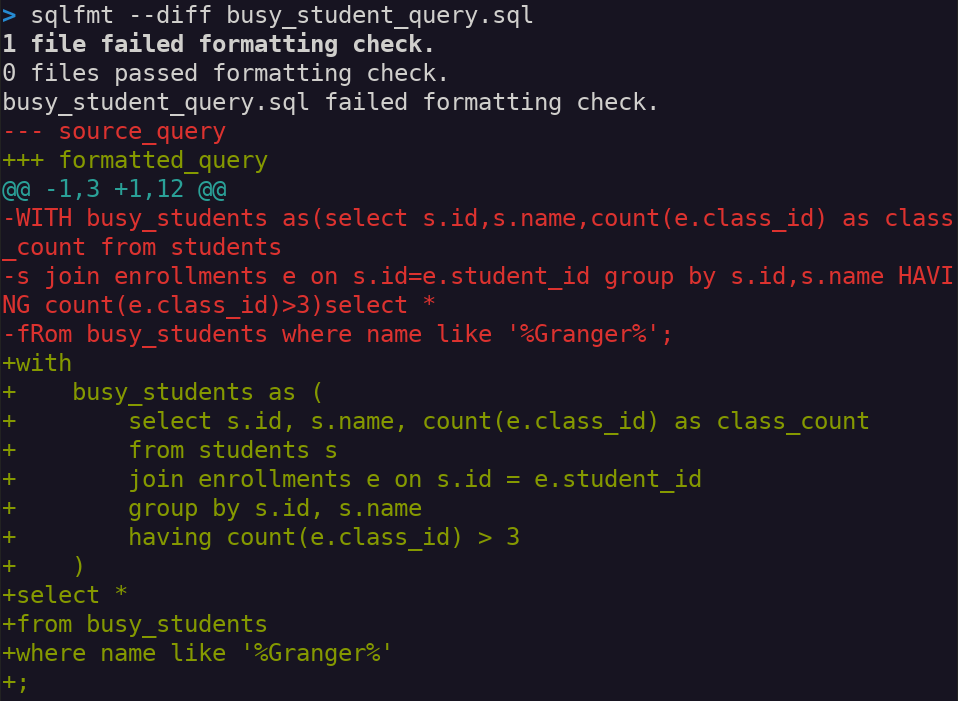
The output shows a git-like difference between the current lines (prefixed with "-") and the potential cleansed lines (prefixed with "+"). Again, run sqlfmt busy_student_query.sql without the --diff flag to actually apply the change.
Remember sqlfmt is designed for dbt, so it handles Jinja tags incredibly well. Here's a query using the Jinja tags config, ref, and source:
-- dbt_query.sql before formatting
{{config(materialized='table',tags=['hogwarts','students'],
schema='analytics')}}with student_base as(select id,first_name,last_name from
{{ref('student')}}),house_lookup as(select id,house_name from {{source('core','house')}}),
enrollments as(select student_id,class_id,enrolled_at from {{ref('enrollment')}}),aggregated as
(SELECT s.id,s.first_name,s.last_name,h.house_name,count(e.class_id) as class_count,max(e.enrolled_at
) as last_enrolled_at from student_base s left join enrollments e on s.id=e.student_id join house_lookup
h on s.house_id=h.id group by s.id,s.first_name,s.last_name,h.house_name)select id,first_name,last_name
,house_name,class_count,last_enrolled_at from aggregated order by class_count desc

-- dbt_query.sql after formatting
{{ config(materialized="table", tags=["hogwarts", "students"], schema="analytics") }}
with
    student_base as (select id, first_name, last_name from {{ ref("student") }}),
    house_lookup as (select id, house_name from {{ source("core", "house") }}),
    enrollments as (
        select student_id, class_id, enrolled_at from {{ ref("enrollment") }}
    ),
    aggregated as (
        select
            s.id,
            s.first_name,
            s.last_name,
            h.house_name,
            count(e.class_id) as class_count,
            max(e.enrolled_at) as last_enrolled_at
        from student_base s
        left join enrollments e on s.id = e.student_id
        join house_lookup h on s.house_id = h.id
        group by s.id, s.first_name, s.last_name, h.house_name
    )
select id, first_name, last_name, house_name, class_count, last_enrolled_at
from aggregated
order by class_count desc
Delicious!
There is a caveat. As sqlfmt is designed primarily for dbt workflows, it cannot format all kinds of SQL commands. It's great at formatting select statements that are prevalent in dbt projects. It's not as effective on DDL statements like create table or other DML statements like insert. sqlfmt will try its best to format these other SQL statements but makes no guarantees.
How Do I Automate It?
A tool is only useful if it's used. When developing, it's easy to forget to format the code before pushing commits. That's where a second tool comes in handy: pre-commit.
pre-commit executes every time you make a git commit. It runs tools that check the quality of your code, including things like syntax, format, and styling. Here's how to add sqlfmt as a pre-commit hook:
First install pre-commit:
uv tool install pre-commit
Then create a .pre-commit-config.yaml file in the root of your git repo. This file lists any packages you want to run as git pre-commit hooks. Here we list sqlfmt by identifying its repo on Github:
# .pre-commit-config.yaml
repos:
  - repo: https://github.com/tconbeer/sqlfmt
    rev: v0.29.0
    hooks:
      - id: sqlfmt
        language_version: python
        additional_dependencies: ['.[jinjafmt]']
Back on the command line, install pre-commit into the "git hooks" folder of your repo:

Now pre-commit will run every time you execute git commit. It's helpful to run pre-commit on all files that already exist and are committed:
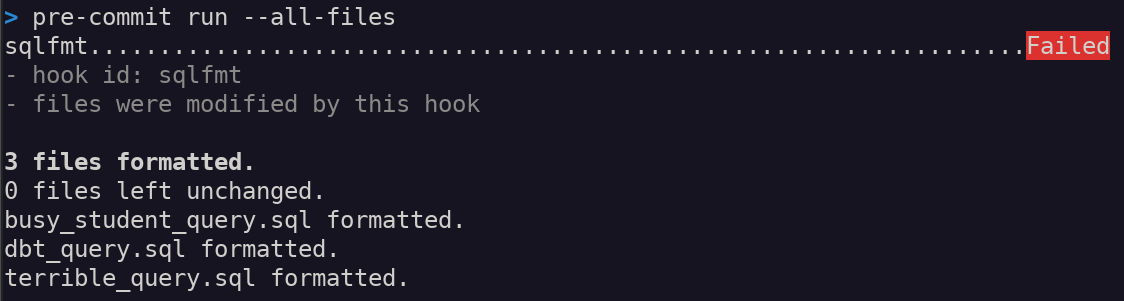
This manual pre-commit command is a one-time call to run sqlfmt on existing files. From now on, pre-commit will apply sqlfmt to any changed files when you make future commits.
For example, suppose you make edits to dbt_query.sql and then stage the changes. When running git commit, the sqlfmt hook will run.
- If the file is formatted to
sqlfmtstandards, the commit will continue. - If not, the commit will stop, and
sqlfmtwill auto-format on your behalf:
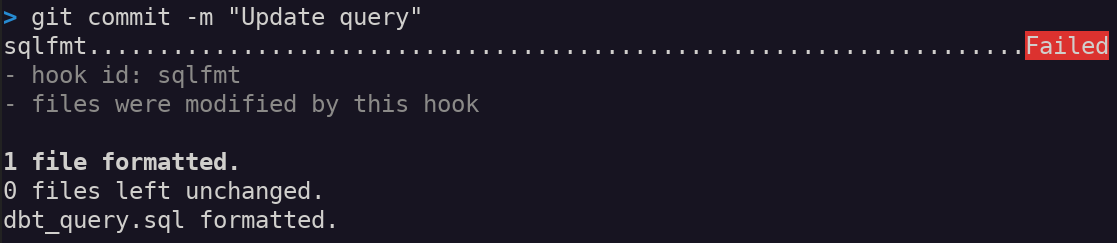
Here the pre-commit hook stopped the commit because the code fails sqlfmt's formatting check. You can review the auto-formatted code, and then re-stage the file before committing again.
That's it! Think of the pre-commit hook as a gatekeeper that makes sure your code is clean for you.
Life's too short to nit-pick over spacing and capitalization. Let sqlfmt handle the grunt work for you while you focus on the actual logic.
Check out the sqlfmt docs and pre-commit docs for more info.
Need help cleaning up your dbt project? I'm ready with my mop and bucket.